
What UI/UX design means for a business
UI is user interface: the screens, buttons, colours and text. UX is user experience: whether someone can finish what they came to do, quickly and without mistakes. A billing screen can look attractive and still take six taps to add a line item. Good UI/UX design fixes the second problem first, then makes it look right.
For business software, this is not decoration. If your staff find an app confusing, they go back to the notebook and the WhatsApp group, and the software you paid for sits unused. If customers find your app or website hard to use, they leave without telling you why.
What we design
We usually design and then build, through our mobile app development and custom software development teams, so nothing is lost between the drawing and the working product. We can also design screens for your own developers to build.
- Android apps for customers: ordering, booking, payments and tracking
- Staff and field apps for logging work, attendance and collections
- Owner dashboards and admin panels for web applications
- CRM, ERP and billing screens that follow how your team really works
- Websites and online stores where the design has to lead to an enquiry or a sale
- Redesigns of existing apps and software that people struggle with
How we design
Understand the work
We start by watching how the job is done today. Who enters what, on which device, in what hurry? What do they write on paper because the current system cannot handle it? A short call with the people who will use the app, or a visit to the counter or site, tells us more than any long requirements document.
Map the tasks and sketch the screens
We list the few tasks that happen most often and make those the fastest. Then we sketch simple wireframes: boxes and labels, no colours, so the discussion stays on what goes where. Changes at this stage take minutes.
Clickable prototype
Before any code is written, we turn the screens into a prototype you can tap through on your own phone. Hand it to a staff member and watch where they hesitate. Every hesitation is a fix made cheaply now instead of expensively later.
Visual design and build
Once the flow works, we apply your colours, type and icons, design every state (empty, loading, error, success) and hand it over to build. You see progress regularly and can change direction early.
Designing for real conditions in Karnataka
Software here is used on budget Android phones, in bright sunlight, on patchy mobile data, by people who may be more comfortable reading Kannada than English. We design for that, not for a large office monitor.
- Large tap targets and high contrast that work outdoors and with one hand
- Kannada and English labels, with numbers and amounts that read clearly in both
- Screens that still work, or fail gracefully, when the network drops
- Short forms with sensible defaults, dropdowns and fewer fields to type
- Plain words instead of software jargon, especially in buttons and errors
Examples from our own products
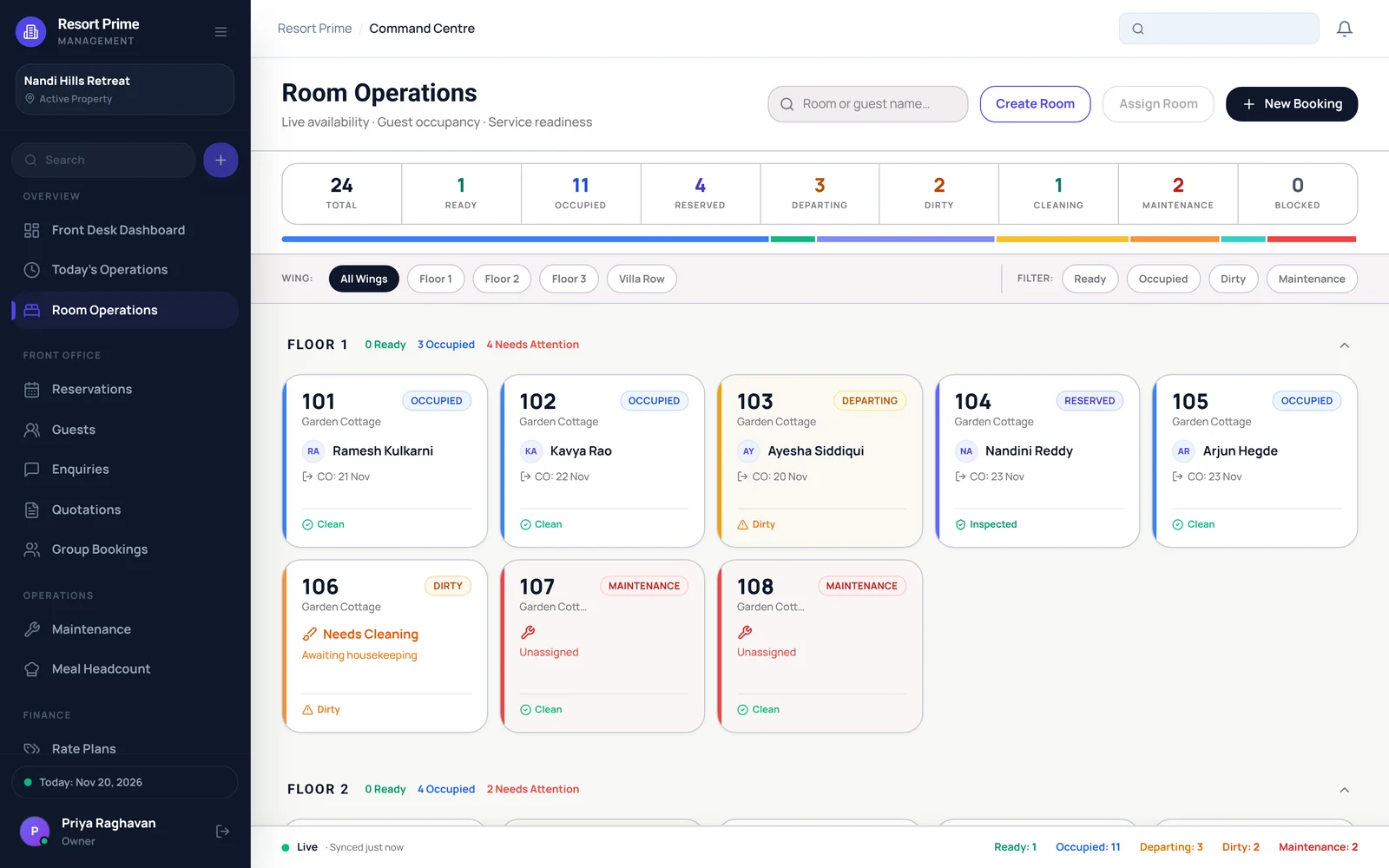
Our own products are where we test these ideas every day. The Resort Prime room board shows every room and date on one screen, so the front desk can see free rooms and check-ins at a glance. Bore Prime lets a borewell contractor record depth drilled on site and bills it by depth slab, without arithmetic on a calculator. Bottle Prime tracks stock from 500 ml bottles to 20 litre jars and the jars still out with customers. Creatin OS puts the sales pipeline, follow-ups and collections on one board.
Each started with watching how the work was really done in resorts, on borewell sites and in water plants, and that is how we approach your project too.
What we need from you
- An hour with the owner to agree the goals and the most important tasks
- Access to a few of the people who will actually use the software
- Samples of current paperwork: bills, registers, forms, spreadsheets
- Your logo and brand colours, if you have them
- Quick feedback on wireframes and prototypes, ideally from real users
Mistakes we help you avoid
- Copying a big brand app without asking whether your users need the same things
- Putting every feature on the home screen so nothing stands out
- Designing on a laptop and never testing on a budget phone in daylight
- Asking only the owner and never the staff who will use it all day
- Skipping the prototype and finding the problems after the app is built
How we measure good design
We look at whether people can finish the main tasks without help, how long those tasks take, how many mistakes or corrections they make, and how many questions come in after launch. After go-live we watch what is used and what is ignored, and adjust. A design is working when staff stop asking how to do things and stop falling back to paper.
Who this is for
Our UI/UX design work suits businesses building a new app or software, and those whose current system is ignored by staff because it is hard to use. We work with owners across Bengaluru, Mangaluru and the rest of Karnataka, over calls, video calls and WhatsApp, and visit your counter or site when it helps.
See our work for the kind of products and sites we make, or contact us to talk through what you need.